CASE Study
Custom Accounting Workflow System
I have worked with this Client very closely to create a custom application for a UK Accounting firm and their employees.
Client: UK-based accounting firm
Scope: End-to-end product design for internal automation system
My role
Product Designer
- Product discovery
- Workflow mapping
- Information architecture
- UX strategy
- UI system design
- Handoff documentation
Context and problem
- Employees manually processed high volumes of receipts and invoices
- Documents came in dozens of inconsistent formats
- Staff had low to average computer proficiency
- Work was fragmented across folders and spreadsheets
The goal was not “make a prettier tool” rather to reduce processing time and errors, and simplify daily workflows for the accounting staff..
Constrains
Low to Average Digital Literacy – Most employees were not power users. The system had to minimize abstraction, reduce navigation complexity, and avoid advanced UI patterns.
Client-Defined Financial Structure (Non-Negotiable) – The folder structure (Q/E, Y/E period logic) reflected established accounting workflows and could not be redesigned. The system had to adapt to their mental model.
Operational Priority Over Administrative Features – Daily task execution (processing documents) had to take precedence over secondary features like employee, supplier, and client administration.
Deep Archive Navigation Risk – Large volumes of financial periods created long scroll states and potential orientation loss. Navigation needed recovery shortcuts.
Accuracy Sensitivity (Financial Domain) – Small errors could have compliance or reporting consequences. Visual clarity and confirmation states were critical.
Trust Barrier Toward Automation – Employees were skeptical of machine learning outputs. The interface needed clear feedback states, manual review with editable fields, and visible processing status to build confidence.
High Variability in Document Formats – Receipts and invoices came in inconsistent layouts, requiring a flexible ML parsing system and UX that allowed correction without friction.
Scoping and workflow mapping
After aligning with the Client on their needs, I helped define the scope and frame the clients needs into the budget.


Clear Folder Status Indicators
Folders visually indicate:
- Folder with no files
- Active folder with no files
- Folder with files
- Active folder with files
This reduces unnecessary clicks and additionally aids in signaling which folders need to be tended for as per Clients workflows and needs.
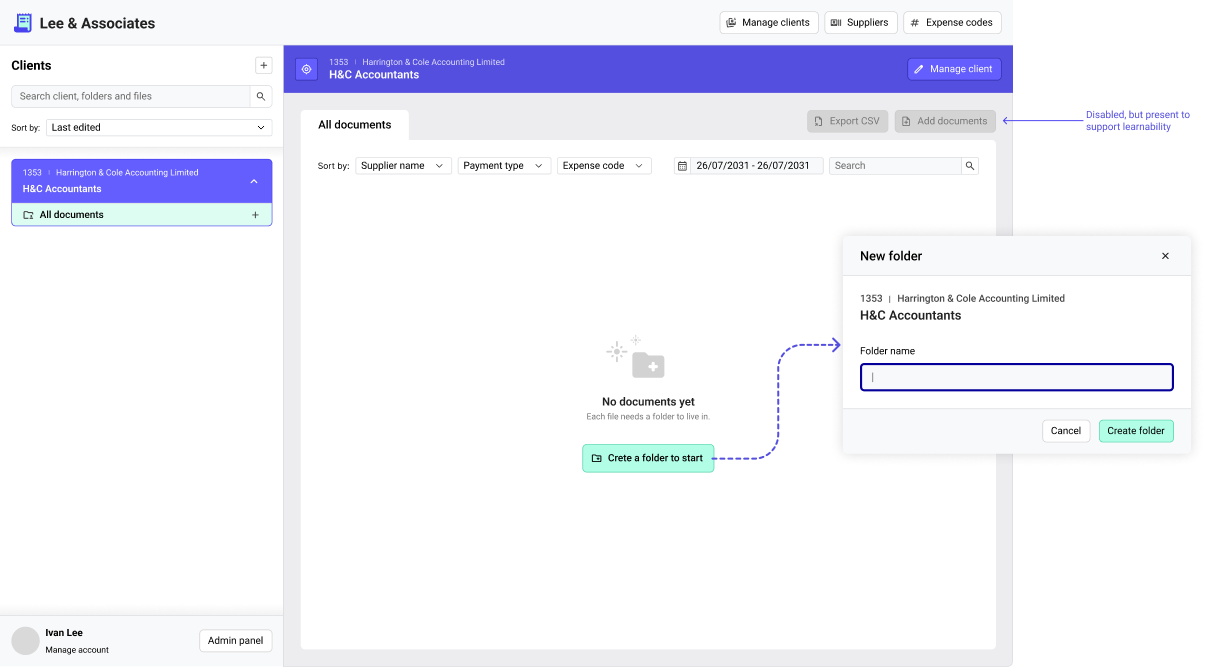
Empty states
Empty state of a “new client” is interesting because the company’s workflow dictates that each documents MUST belong to a folder, yet they still need to review all the documents at once from all the existing folders.
Expense codes
Just as we had to distinguish between folder statuses, expense codes were also in need of a visual cue, to improve the speed of data processing by the employees.
The distinction was made between payment types:
- Wire transfer
- Card payment
- Cash payment

